
Wyze - Never Wonder
Wyze Labs Inc.Lifestyle
4.441.50K Reviews
- Version
- 3.25.1.1037
- Installs
- 10.00M
- Age Rating
- Everyone
Screenshots

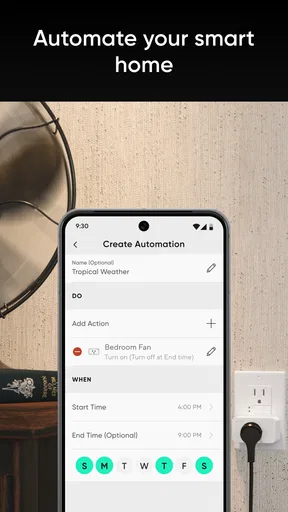
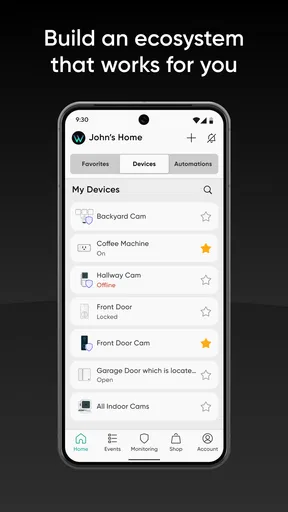
Our Review of Wyze - Never Wonder
 Analysis by Appyee
I think the most useful way to judge a smart-home app is to ask what it lets you do with the equipment you already own—or plan to buy—and whether that convenience is worth the effort of setting everything up. Wyze is a Lifestyle app from Wyze Labs Inc. that brings supported home devices into one place. I’d consider it when I wanted to start small, keep everyday controls close at hand, and build up a connected home gradually rather than commit to a large system from day one.
What the free download does—and what paid items mean
The app is free to download, so trying it does not require an upfront app purchase. That is useful if I’m still deciding whether managing devices from a phone suits my routine. There are in-app purchases, with listed item prices ranging from $2.99 to $259.99. I would treat that as a broad range rather than assume every user needs to pay: the right choice depends on what an individual item offers and whether it solves a problem I actually have.
That distinction matters with smart-home products. The app is the control point, but the experience also depends on having compatible devices; downloading it alone does not turn ordinary lights or appliances into connected ones. Before spending money, I’d identify one specific task—such as checking a camera feed or scheduling a light—and confirm that the device I’m considering works with the app. I wouldn’t buy a bundle simply because the app can manage several kinds of equipment.
Where the value shows up at home
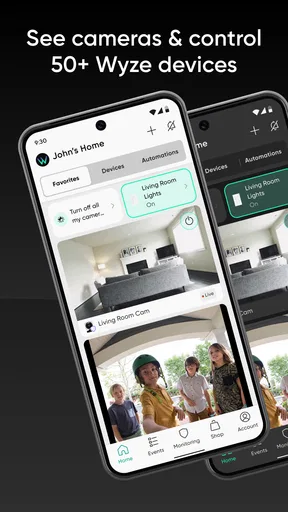
The strongest value is convenience across different types of devices. A camera, bulb, plug, or switch can each be useful on its own, but having supported products accessible from one app can make routine tasks less scattered. I can see the appeal of checking a camera and changing a light setting without switching between separate control tools. For someone starting with just one device, that shared control also leaves room to add another later if the first one proves useful.
In everyday use, I’d make a smart bulb’s schedule do a modest job rather than automate everything at once: set a regular evening time, then adjust brightness when I’m home. A plug timer can help with a simple on-and-off routine for a suitable appliance, while remote controls are handy when I’ve forgotten to switch something off. These are small wins, not a substitute for checking that a device is appropriate for the task or for using ordinary safety precautions.
Trade-offs to consider before building a setup
A single app can simplify control, but it also means the value of the app depends on the devices it supports and on how reliably the connection works in my home. A delayed camera stream is more frustrating when I’m checking something time-sensitive than when I’m merely changing a lamp. I’d treat alerts as helpful prompts, not as a guarantee that I will see every event immediately or as a replacement for a dedicated safety plan.
There is also a difference between setting up a device and living with it. Each extra camera, bulb, or plug can add another notification, schedule, or control to keep tidy. I’d start with one clear use case, learn how its alerts and settings behave, and add more only if the routine feels genuinely easier. If I mainly want a single camera and already prefer its maker’s dedicated app, another control hub may add little. Likewise, people who want a fully integrated system across many brands should check device compatibility before choosing hardware.
Who is likely to get the most from it?
I’d recommend looking at Wyze if you’re curious about connected-home routines, want phone-based access to supported devices, and are comfortable setting up each product yourself. It can make particular sense for a renter or first-time smart-home user who wants to begin with one bulb or camera and expand cautiously, subject to the devices and arrangements available to them. It is less compelling if you have no interest in remote controls or schedules, or if you would rather avoid accounts, device setup, and app notifications altogether.
People comparing it with the usual alternatives should focus on the job they need done, not on the number of device types an app can list. A single-brand camera app may be simpler when all I need is that camera; a broader smart-home platform may be a better fit if I already have a mixed collection of equipment and want one ecosystem to coordinate it. Wyze’s appeal is its combination of device controls in one place, while the sensible choice still depends on compatibility, the specific products, and how much setup I’m willing to manage.
On Google Play, the app has a 4.4 average from around 168,000 ratings and more than 5 million installs. It is rated for Everyone, and its current version is 3.10.0.745, with Android 10 as the minimum operating-system requirement. The scale of use suggests many people have found a reason to try it, but those figures can’t tell me whether a particular camera will connect well in my home or whether I’ll like managing devices this way.
My practical advice is to choose one compatible product for a task you already have, install the app, and see whether the setup and daily controls feel worthwhile before expanding. The app itself costs nothing to download, while paid in-app items are separate decisions; I’d weigh each one against a clear need rather than assume paid options are essential. That approach keeps the first step low-commitment and makes it easier to tell whether the convenience is real for you.
Ever thought about turning your home into a smart haven without breaking the bank? Well, let me tell you about Wyze—an app that’s making waves in the world of home automation. I’ve spent some quality time fiddling around with it, and here's the lowdown on what makes it tick.
Your Home, Only Smarter
Let's dive right in. Wyze is a nifty little app that connects with a range of affordable smart devices, all designed to make your life a whole lot easier. From security cameras to smart bulbs, Wyze provides seamless control and convenience at your fingertips. I must say, it’s quite the game-changer if you’re looking to dip your toes into smart home tech without going all-in on expensive gadgets.
Getting Started with Wyze
Setting up the app was surprisingly simple. Just download it from the App Store or Google Play, create an account, and you’re pretty much good to go. The interface is clean and intuitive, which is a huge plus for those of us who aren’t exactly tech wizards. Pairing devices is a breeze, thanks to the clear step-by-step instructions within the app.
One thing I really appreciated was the quick setup process. Within minutes, I had my Wyze Cam connected and ready to monitor my front porch. The app guides you through the whole thing, making sure you’re never left scratching your head.
Features That Stand Out
What really caught my eye was the range of devices you can control through the app. Here’s a quick rundown of what you can manage:
- Security Cameras: Live streaming, motion detection alerts, and even night vision.
- Smart Bulbs: Adjust brightness and color, set schedules, and create scenes.
- Plugs and Switches: Control appliances remotely, set timers, and monitor energy usage.
The app also integrates with Amazon Alexa and Google Assistant, which means you can control your devices with a simple voice command. Pretty cool, right?
Everyday Use and Reliability
Now, let’s talk about how it performs on a day-to-day basis. I’ve been using the Wyze Cam as a baby monitor and the smart bulbs to create a cozy ambiance in my living room. The app’s performance is mostly smooth, with occasional minor glitches, like a slight delay in live streaming. But hey, nothing that a quick refresh can’t fix!
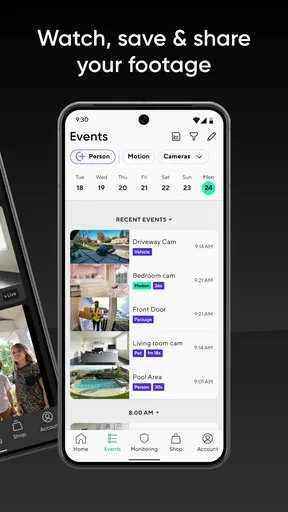
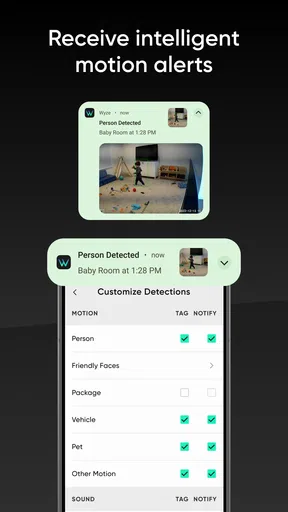
The notification system is quite reliable, popping up alerts whenever there’s motion detected. It’s reassuring to know that I can keep an eye on things even when I’m not home.
Final Thoughts
All in all, Wyze is a fantastic app for anyone looking to step into the world of smart home automation without burning a hole in their wallet. It’s user-friendly, versatile, and connects you to a suite of devices that genuinely make life easier. Sure, it’s not without its minor hiccups, but for the price point, it’s hard to beat.
If you’re keen to give it a try, you can grab the app on both iOS and Android. Trust me, once you start automating, you’ll wonder how you ever lived without it.
Privacy and Permissions
See what permissions an app requests and how it handles your data.
- Contacts
- read your contacts
- Location
- approximate location (network-based), precise location (GPS and network-based)
- SMS
- read your text messages (SMS or MMS), receive text messages (SMS)
- Phone
- directly call phone numbers, read call log, read phone status and identity
- Photos/Media/Files
- read the contents of your USB storage, modify or delete the contents of your USB storage
- Storage
- read the contents of your USB storage, modify or delete the contents of your USB storage
- Camera
- take pictures and videos
- Microphone
- record audio
- Wi-Fi connection information
- view Wi-Fi connections
- Device ID & call information
- read phone status and identity
- Other
- view network connections, pair with Bluetooth devices, access Bluetooth settings, change network connectivity, allow Wi-Fi Multicast reception, connect and disconnect from Wi-Fi, disable your screen lock, full network access, change your audio settings, run at startup, reorder running apps, control vibration, prevent device from sleeping
Verdict
Strengths of Wyze - Never Wonder
- Intuitive user interface for easy navigation.
- Affordable pricing with high-quality features.
- Seamless integration with smart home devices.
- Regular updates enhance app functionality.
- Customizable alerts for enhanced security.
Limitations of Wyze - Never Wonder
- Limited compatibility with non-Wyze devices.
- Occasional connectivity issues reported.
- No offline mode for app functionality.
- Some features require a subscription.
- Limited customer support response times.
Similar Picks in This Category
View All
SmartThings
Samsung Electronics Co., Ltd.4.6

Google Home
Google LLC4.0

Pinterest4.2

Astrotalk - Talk to Astrologer
Astrology & Horoscope4.7

My Verizon
Verizon Consumer Group4.5

Samsung Wallet (Samsung Pay)
Samsung Electronics Co., Ltd.4.1
Frequently Asked Questions
What features does the Wyze app offer for smart home management?
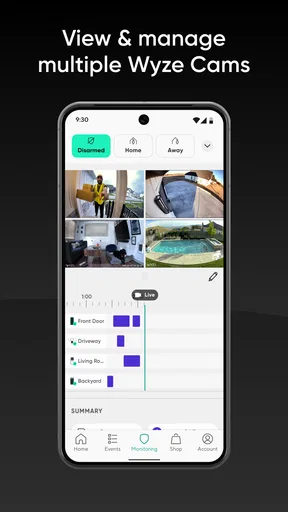
The Wyze app offers a comprehensive suite of features for smart home management, including real-time video streaming from Wyze cameras, smart lock controls, thermostat adjustments, and integration with Alexa and Google Assistant for voice commands. Users can also set up custom alerts, schedule automation, and manage multiple devices from a single interface.
Is the Wyze app compatible with both Android and iOS devices?
Yes, the Wyze app is available for download on both Android and iOS platforms. It is designed to provide a seamless experience across different devices, ensuring that users can manage their smart home products from their smartphone or tablet, regardless of the operating system.
How secure is the Wyze app in terms of user data and privacy?
Wyze prioritizes user data security by implementing end-to-end encryption for video streams and personal information. The app requires users to create an account with a secure password and offers two-factor authentication for added security. Regular updates ensure that any vulnerabilities are quickly addressed to protect users' privacy.
Can I use the Wyze app to control devices remotely when I’m not at home?
Yes, the Wyze app allows for remote management of all connected devices as long as you have an internet connection. This means you can check camera feeds, adjust thermostat settings, or lock doors from anywhere, providing peace of mind and convenience even when you're away from home.
Are there any subscription fees for using the Wyze app?
The Wyze app itself is free to download and use, but some advanced features, such as cloud storage for video recordings, may require a subscription. Wyze offers optional service plans that include additional storage and premium features, allowing users to choose the plan that best fits their needs and budget.
